If you notice a sudden and unexpected increase in message volume, quota consumption, or the number of posts collected from X (formerly Twitter), the cause may not be a change in your search configuration.
We have observed situations where legitimate social media accounts are compromised and converted into spam bots. Once compromised, these accounts can begin publishing thousands of spam messages, dramatically increasing the number of collected posts and consuming large amounts of quota in a short period of time.
Symptoms
You may experience one or more of the following:
- Sudden spikes in message volume from X.
- Unexpected increases in quota consumption.
- Cases reaching quota limits much earlier than expected.
- Unusually large numbers of messages associated with a single tracked account.
- Searches returning repetitive or spam-like content.
- Monitoring cases that previously generated normal volumes suddenly collecting thousands of additional messages.
Cause
The most common cause is that a tracked account has been hacked and repurposed as a spam bot.
For example, attackers may compromise popular accounts, rename them, and begin publishing large volumes of promotional or scam content. Because Monitor continues to follow the account, all of these posts are collected, resulting in dramatically increased consumption.
How to Identify Affected Accounts
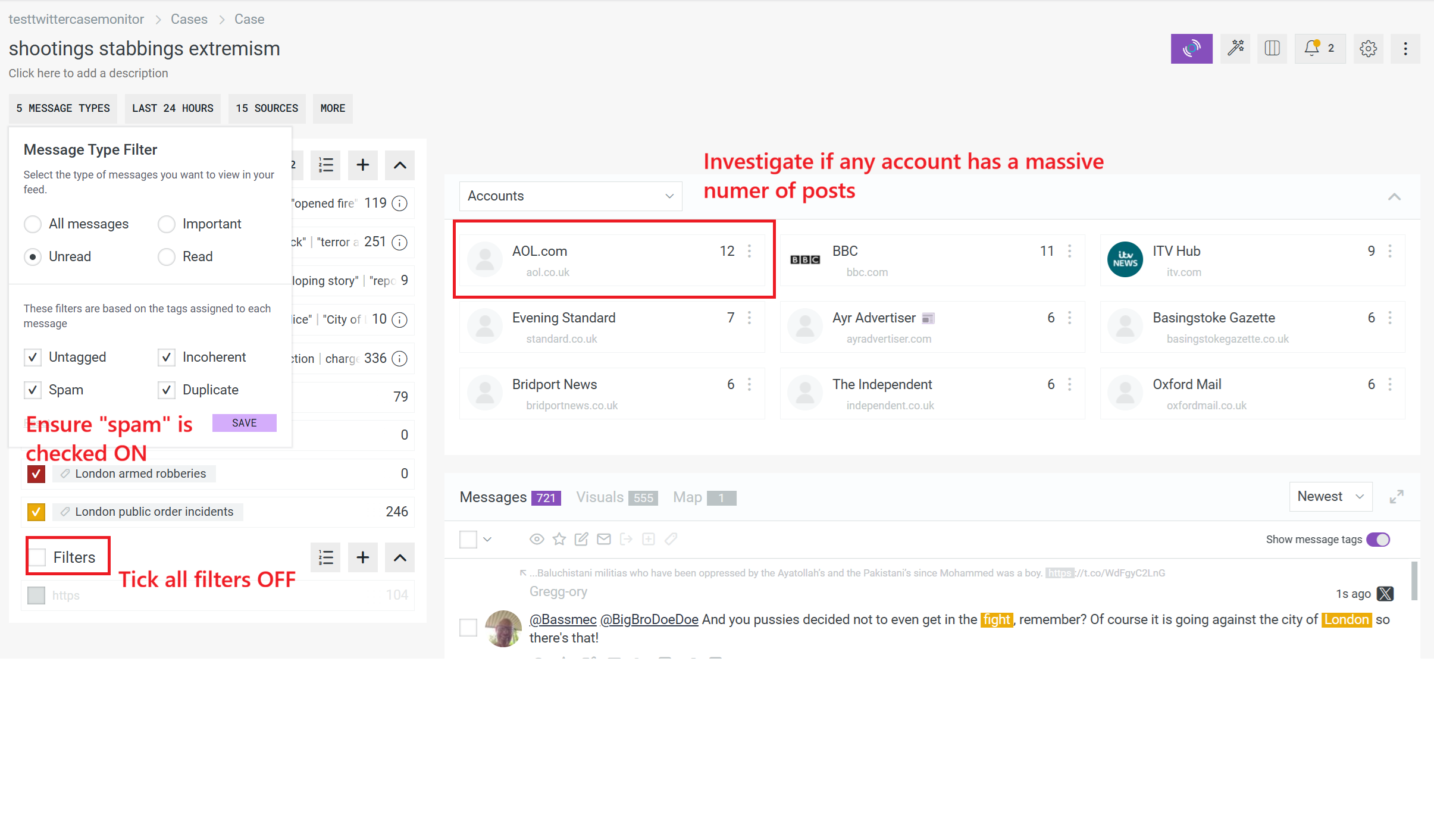
To locate the source of the spike:
- Open the affected case.
- Ensure spam messages are visible.
- Enable all searches.
- Disable all filters.
- Open the Accounts/Actors widget.
- Look for accounts with unusually high post counts, often numbering in the thousands.
- Compare these accounts with the searches generating the largest number of messages.
- Review whether these accounts have recently changed names or exhibit obvious spam behaviour.
How to Resolve the Issue
Once a problematic account has been identified:
Option 1: Remove the Account
If the account is being monitored through an account list:
- Open the account list containing the account.
- Locate the spam account.
- Remove it from the list.
- Allow collection to continue without the compromised account.
Option 2: Refine Your Monitoring
If the account is not required for the investigation:
- Exclude the account entirely.
- Narrow searches to reduce unnecessary collection.
- Review large-volume searches and assess whether they still provide valuable intelligence.
Preventing Future Occurrences
To reduce the likelihood of unexpected quota consumption:
- Regularly review the Accounts widget for unusual activity.
- Monitor quota dashboards to identify abnormal consumption patterns early.
- Periodically assess tracked accounts for relevance and legitimacy.
- Investigate sudden increases in message volume before expanding quotas.
- Configure monitoring cases as narrowly as possible to avoid excessive data collection.