Search terms
Search terms are word or word combinations based on which the monitor collects messages.
- For example, if you search for 'fire', the system retrieves all messages containing the word 'fire'.
- In addition to single words, you can also search by word combinations, such as 'fire home'. The system retrieves all messages that include the word 'fire' and 'home'. In random order and at any place in the sentence, regardless of whether the words are capitalized or not.
Search terms can be added to:
- Searches
- Filters
Exclude terms
Exclude terms are words or word combinations based on which messages are excluded
- For example, if you are looking for messages about a fire, you can exclude the term 'video' in order for the system to not show messages that are about shooting a video. In other words, messages contain both the word 'shooting' and 'video'. In random order and at any place in the sentence.
Exclude terms can be added to:
- A building block
- A location
- In a case
Using emojis in search terms and exclude terms
Emojis work like any other keyword. You do not need quotation marks or special syntax. You can use them in searches, filters and exclude terms, and the monitor collects the matching messages.
What you can enter
- Single emojis, for example
 . A bare emoji returns the same results as the same emoji in quotation marks.
- Combined emojis: flags (
 ), skin-tone variants (
 ) and joined emojis (
 ). The full sequence is treated as one term and is not shortened or changed.
- Emojis combined with words, for example
fire .
- Emojis in building blocks. An emoji in a building block's search term or exclude term behaves exactly as if you had typed it directly into the search, filter or exclude.
How matching works
- A message is found when it contains the exact emoji or emoji sequence you searched for.
- Emojis that differ only by an invisible presentation character are treated as the same emoji. For example,
⚔and⚔️find each other's messages. - Recently released emojis work the same way as long-established ones.
Limitations for X (formerly Twitter)
X cannot process some emoji shapes in its collection rules. Maltego never blocks you from entering these emojis. Instead, the term is left out of the collection from X only, and all other sources still collect it exactly as you typed it.
The affected shapes are:
- Joined emojis, for example
- Emoji hashtags
When a search contains one of these terms and collects from X, a notice shows which term is not collected from X. This applies to searches only. Exclude terms are left out of the X collection silently.
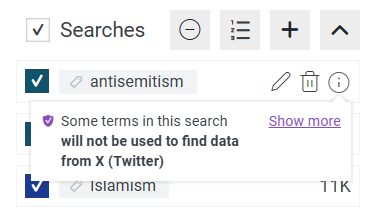
Searches show indicators, if some terms are not used to find data from Twitter.
Invisible characters
For security reasons, hidden characters are still rejected. A joiner character placed next to non-emoji characters, or a doubled joiner, is not accepted.
Blocked terms in exclude terms
An exclude term that an administrator has blocked is kept as it is. Only the X-unsupported emoji shapes listed above are left out of the X collection.